- Ana Sayfa /
- Elektronik /
- Bilgisayar Aksesuarları /
- Tablet Replacement Parts /
- Screens /
- Touch Screen Panel Digitizer (Without LCD Dis...
0 ratings




Ürün No:
77198500
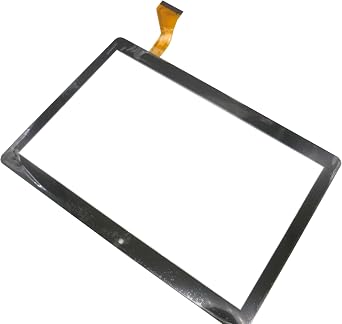
Touch Screen Panel Digitizer (Without LCD Display) Replacement Compatible with Dragon Notepad K10 10.1 inch Tablet (Black)
Ürün No:
77198500
TRY 928
Fiyat Detayları
Kargo ve Gümrük Ücretleri Hariç ( Kargo ve gümrük ücretleri ödeme sırasında hesaplanacaktır )
*Tüm ürünler ABD ülkesinden ithal edilecektir
Stokta var
 USA mağazasından ithal edildi
ADET:
Stokta sadece 7 ürün kaldı.
Şimdi sipariş verin ve şu tarihte alın Çarşamba, Ağustos 26
Güvenli işlem
Ubuy, güvenliğiniz ve gizliliğiniz için yoğun çaba sarf etmektedir. Gelişmiş ödeme güvenlik sistemimiz, iletim sırasında bilgilerinizi AES (Gelişmiş Şifreleme Standartları) ve SSL (Güvenli Soket Katmanı) protokolleri kullanarak şifreleyerek gizliliği sağlar. Ödeme bilgileriniz, üçüncü taraf satıcılarla paylaşılmadığı için %100 güvende.
En İyi Lojistik Ortaklarımız


Broken your Touch Screen Panel Digitizer (without LCD Display), don't need to change new machine, just buy this item and replace your damaged Touch Screen Panel Digitizer (without LCD Display), let your Device work again.

Hızlı
Kargo

Ücretsiz
İade*

Güvenli Paketleme

%100 Orijinal Ürünler

PCI DSS Uyumlu

ISO 27001 Sertifikalı















Note: Step Down Voltage Transformer required for using electronics products of ABD store (110-120). Recommended power converters Şimdi Al.


Öne Çıkan Özellikler
Precise Compatibility
Designed specifically for the Dragon Notepad K10 10.1 inch tablet, ensuring a perfect fit and seamless integration for hassle-free replacements.
Enhanced Touch Sensitivity
The high-quality digitizer offers exceptional touch responsiveness, providing a smooth user experience and quick access to all tablet features.
Easy Installation
With user-friendly design and included installation tools, this digitizer allows for straightforward DIY replacement, saving time and repair costs.
Ürün Detayları
| Product Dimensions (L x W x H) | 1.97 x 1.18 x 0.79 inches (5 x 3 x 2 cm) |
| Item Weight | 1.08 pounds (490 grams) |
| Other display features | Wireless |
| Color | Black |
| Manufacturer | LeHang |
| Date First Available | May 31, 2022 |
Kim Satın Almalı?

-
DIY Repair Enthusiasts
Ideal for users comfortable with electronics repair and seeking a cost-effective solution to replace their tablet screen.
-
Budget-Conscious Users
Perfect for those wanting to extend the life of their Dragon Notepad K10 tablet without investing in a new device.
-
Tablet Maintenance
Suits individuals needing a replacement for damaged touch screens, ensuring continued use of their existing tablet.

-
Non-technical Users
Not suitable for those unfamiliar with electronic repairs, as installation may require technical skills and tools.
ÜRÜN AÇIKLAMASI
Herhangi bir sorunuz mu var? Bizimle sohbet edin
Müşteri Soruları ve Cevapları
-
Soru:
What is the main function of the Touch Screen Panel Digitizer for the Dragon Notepad K10?
Cevap: The Touch Screen Panel Digitizer serves as the interface for user interaction with the Dragon Notepad K10 tablet. It converts touch inputs into signals that the device's software interprets, allowing users to navigate, browse, and interact with applications seamlessly. For instance, if the screen isn't responsive or has cracks, replacing the digitizer ensures your tablet functions like new, restoring its touch capabilities. -
Soru:
How do I know if I need to replace my tablet's digitizer?
Cevap: Signs that indicate a need for replacement include an unresponsive touch screen, areas of the screen that do not register touch, or physical damage like cracks or scratches. If basic troubleshooting fails, such as rebooting the device or performing a soft reset, it's likely time for a new digitizer. By replacing it, you can regain full control over your tablet, making it functional for everyday tasks like browsing and note-taking. -
Soru:
Can I replace the digitizer myself, or should I seek professional help?
Cevap: Replacing the digitizer can be a DIY project if you have some technical skills and the right tools, such as screwdrivers and opening tools. However, if you're unfamiliar with tablet repairs, consulting with a professional is advisable. Seeking help can ensure the replacement is done with precision, minimizing the risk of further damage, and allowing you to quickly return to using your tablet without stress. -
Soru:
Is the digitizer compatible with other models apart from the Dragon Notepad K10?
Cevap: The Touch Screen Panel Digitizer is specifically designed for the Dragon Notepad K10 tablet, ensuring optimal fit and performance. While some similar models may use compatible parts, each model may have distinct dimensions or connector placements. For best results, ensure you purchase components specifically designed for your tablet model to avoid any functional issues after installation. -
Soru:
What tools will I need to install the digitizer?
Cevap: To install the digitizer, you will require tools such as a small Phillips head screwdriver, a plastic opening tool, and possibly tweezers. Additionally, having a work surface that minimizes static electricity can help avoid damage to your device’s internals. Having the correct tools ensures that the installation process is smooth, allowing you to focus on accurately replacing the digitizer without unnecessary hassle. -
Soru:
What should I do if my screen is cracked but still responsive?
Cevap: If your screen is cracked yet still responsive, it's advisable to replace the digitizer before the damage worsens. Cracked screens can lead to further deterioration and affect touch sensitivity over time. Addressing the issue promptly not only preserves functionality but also enhances your user experience while using applications like note-taking or browsing, making your tablet safer and more enjoyable. -
Soru:
What are common troubleshooting steps before replacing the digitizer?
Cevap: Common troubleshooting steps include restarting your tablet, checking for software updates, and performing a factory reset. These actions can sometimes resolve temporary issues with touch responsiveness. If the problems persist despite these measures, replacing the digitizer becomes a practical solution to restore usability and ensure your tablet operates smoothly for tasks such as online reading or digital note-taking. -
Soru:
Is it safe to use my tablet if the digitizer is malfunctioning?
Cevap: Using a tablet with a malfunctioning digitizer can lead to frustrating experiences such as inadvertent app launches or difficulty navigating. It is advisable to avoid relying on the device for critical tasks until the digitizer is replaced. Continuing to use it in this state may not only hinder productivity but could also result in accidental damage, such as further cracking of the screen or issues with internal components. -
Soru:
What is the difference between a digitizer and an LCD display?
Cevap: The digitizer and LCD display serve distinct functions within a tablet. The digitizer is responsible for registering touch inputs, while the LCD display presents images and content to the user. If you're experiencing visual issues alongside touch problems, you may need to consider both components for replacement. Understanding this distinction can help you accurately diagnose issues and determine the necessary repairs to restore full functionality. -
Soru:
Where can I buy Touch Screen Panel Digitizer Without LCD Display Replacement Compatible with Dragon Notepad K10 10.1 inch Tablet Black in Turkey?
Cevap: You can purchase the Touch Screen Panel Digitizer without the LCD display replacement for the Dragon Notepad K10 tablet on Ubuy in Turkey. Ubuy offers a user-friendly platform that provides a range of options, allowing you to choose the best product for your repair needs. With competitive pricing and delivery options, Ubuy makes it convenient for customers to access quality replacement parts.
LeHang Screens Editorial Review
Editör incelemesi bulunamadı
Müşteri Yorumları ve Puanları
1 müşteri puanları
-
5 Star
100%
-
4 Star
0%
-
3 Star
0%
-
2 Star
0%
-
1 Star
0%
Bu ürünü değerlendirin
Düşüncelerinizi diğer müşterilerle paylaşın
Artıları
- Easy to install
- High sensitivity touch
- Durable and long-lasting
- Compatible with Dragon Notepad K10
- Improved screen responsiveness
Eksileri
- No installation instructions included.
PLATFORM GÜVENİ VE ALICI GÜVENCESİ

MA
Mohammad
Verified buyer
“Excellent quality and original too,when ubuy send original things I will appreciate that ,I very satisfied thank you”
23 July 2026 · via Trustpilot
CK
Chitra
Verified buyer
“The order and delivery progress was communicated very well. Package arrived within the estimated time. Products arrived as expected in good condition.”
22-Jul-26 · via Trustpilot
K
kund
Verified buyer
“Good supply of products. Safe payment methods, and shipment worldwide! Genuine products.”
23-Jul-26 · via Trustpilot
OO
Onesi
Verified buyer
“Was my first time buying a product from Ubuy, but I found it so helpful. This is reliable. Gonna place a new order!”
22 July 2026 · via Trustpilot
SJ
SAO JOHN
Verified buyer
“Ubuy is a great online platform to buy stuff. Reliable, fast delivery time and great value for money. I've been using Ubuy online shopping platform for three years now and will continue to do so.”
23 July 2026 · via Trustpilot
Güvenli Ödeme
Küresel Teslimat
Kolay İade
Orijinal Ürünler
Ürün Fiyat Geçmişi
Önemli bilgi
- Sınırlamalar : Uluslararası olarak gönderilen ürünler için, üretici garantisinin geçerli olmayabileceğini lütfen unutmayın; üretici servis seçenekleri mevcut olmayabilir; ürün kılavuzları, talimatlar ve güvenlik uyarıları hedef ülke dillerinde olmayabilir; ürünler (ve beraberindeki malzemeler) varış ülkesi standartlarına, spesifikasyonlarına ve etiketleme gerekliliklerine uygun olarak tasarlanmayabilir; ve ürünler hedef ülke voltajına ve diğer elektrik standartlarına uygun olmayabilir (uygunsa bir adaptör veya dönüştürücü kullanılmasını gerektirir). Alıcı, ürünün yasal olarak hedef ülkeye ithal edilebildiğinden emin olmaktan sorumludur. Ubuy veya bağlı kuruluşlarından sipariş verirken, alıcı kayıtlı ithalatçıdır ve varış ülkesinin tüm yasa ve düzenlemelerine uymalıdır.
- Ubuy küresel bir arama motoru olduğundan, Ubuy'da listelenen tüm ürünler satılık değildir. Ürünler ihracat/ticaret düzenlemelerine tabidir.
TRY 928
Şimdi sipariş verin ve şu tarihte alın Çarşamba, Ağustos 26
Bu ürün ülkemde kısıtlı değil. (Bu ürün ülkenizde kısıtlı değilse lütfen yukarıdaki bağlantıya tıklayın, böylece ekibimiz inceleyecek ve izin verecektir).
ADET:
Stokta sadece 7 ürün kaldı.
Güvenli işlem
PCI DSS uyumlu ve ISO 27001:2022 sertifikalı olup, her siparişte şifrelenmiş ödeme ve tam alıcı koruması sunar.
En İyi Lojistik Ortaklarımız
En Hızlı Sınır Ötesi Teslimat
Özellikler ve Faydalar
- Replacement Touch Screen Panel Digitizer (without LCD Display)
- Compatible with Dragon Notepad K10 10.1 inch Tablet
- Easy to install, professional technician recommended
- Avoid the need to buy a new machine
- Fragile product, handle with care
- Contact seller for assistance
Ubuy Güvencesi
%100 orijinal ürünler, PCI DSS uyumlu ödeme güvenliği, ISO 27001 sertifikalı veri koruması, en hızlı sınır ötesi teslimat, ücretsiz iade * ve her siparişte güvenli paketleme ile kaygısız alışverişin keyfini çıkarın.