- Ana Sayfa /
- Software /
- Video /
- Video Editing /
- Screen recorder software for PC record videos and take ...
0 ratings


Ürün No:
65045440
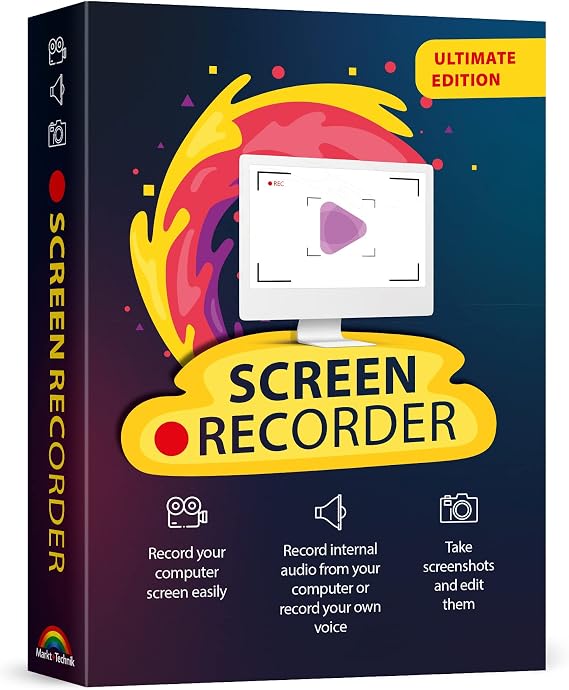
Screen recorder software for PC record videos and take screenshots from your computer screen compatible with Windows 11, 10, 8, 7
Ürün No:
65045440
TRY 1326
Fiyat Detayları
Kargo ve Gümrük Ücretleri Hariç ( Kargo ve gümrük ücretleri ödeme sırasında hesaplanacaktır )
*Tüm ürünler ABD ülkesinden ithal edilecektir
0 ratings
Bir yorum yazın
Stokta var
 USA mağazasından ithal edildi
Şimdi sipariş verin ve şu tarihte alın Monday, Ağustos 31
Güvenli işlem
Ubuy, güvenliğiniz ve gizliliğiniz için yoğun çaba sarf etmektedir. Gelişmiş ödeme güvenlik sistemimiz, iletim sırasında bilgilerinizi AES (Gelişmiş Şifreleme Standartları) ve SSL (Güvenli Soket Katmanı) protokolleri kullanarak şifreleyerek gizliliği sağlar. Ödeme bilgileriniz, üçüncü taraf satıcılarla paylaşılmadığı için %100 güvende.
En İyi Lojistik Ortaklarımız


Hızlı
Kargo

Ücretsiz
İade*

Güvenli Paketleme

%100 Orijinal Ürünler

PCI DSS Uyumlu

ISO 27001 Sertifikalı















Note: Step Down Voltage Transformer required for using electronics products of ABD store (110-120). Recommended power converters Şimdi Al.


Öne Çıkan Özellikler
Multi-Platform Compatibility
Works seamlessly with Windows 11, 10, 8, and 7, ensuring users can record and capture screen content on a wide range of devices without compatibility issues.
High-Quality Recording
Delivers superior video quality with customizable settings, allowing users to create professional-looking screen recordings that meet their specific needs.
Easy Screenshot Capture
Quickly take screenshots with a simple interface, enabling users to effortlessly capture important moments from their screen without additional software.
Ürün Detayları
- Capture videos and screenshots with sound from your computer screen
- Track mouse movement on screen recordings
- Integrate webcam footage into screen videos
- Simple editing capabilities for recordings
- Ideal for creating video tutorials, gaming content, and online classes
- Compatible with Windows 11, 10, 8, and 7
| Package Dimensions | 7.52 x 5.35 x 0.59 inches (19.1 x 13.6 x 1.5 cm); 2.4 ounces (68.04 grams) |
| Date First Available | August 16, 2022 |
| Manufacturer | Markt + Technik |
Kim Satın Almalı?

-
Content Creators
Ideal for YouTubers and streamers who need to capture and edit engaging video content efficiently.
-
Educators
Perfect for teachers and trainers creating instructional videos or tutorials to enhance remote learning experiences.
-
Business Professionals
Useful for professionals conducting presentations or meetings who wish to share their screens for clearer communication.

-
Casual Users
Individuals needing simple screen captures may find this software overly complex for basic tasks.
ÜRÜN AÇIKLAMASI
Screen recorder software for PC record videos and take screenshots from your computer screen compatible with Windows 11, 10, 8, 7
Herhangi bir sorunuz mu var? Bizimle sohbet edin
Müşteri Soruları ve Cevapları
-
Soru:
What types of tasks can I perform with screen recorder software for PC?
Cevap: Screen recorder software for PC is versatile and can be used for a variety of tasks, such as capturing gameplay, conducting online tutorials, or creating presentation videos. Whether you're demonstrating software features or providing customer support tutorials, these tools allow you to record high-quality video along with audio. For instance, educators can create instructional videos that enhance learning engagement while gamers can share their gameplay highlights with friends. -
Soru:
Is screen recording software for PC compatible with all versions of Windows?
Cevap: Yes, most screen recorder software for PC is designed to be compatible with various versions of Windows, including Windows 11, 10, 8, and 7. This compatibility enables users on different systems to take advantage of screen recording functionalities. For example, whether you're updating from an older Windows version or using the latest, you can record your screen, ensuring that everyone has access to similar features regardless of the platform they are using. -
Soru:
What features should I look for in screen recorder software?
Cevap: When selecting screen recorder software, consider features like screen capture resolution, audio recording capabilities, the ability to record webcam videos, and editing options. High-resolution capture and clear audio are crucial for making professional-quality videos. For example, if you're creating marketing content, ensuring crisp visuals and sound can significantly impact audience engagement. -
Soru:
Can I use screen recorder software to take screenshots?
Cevap: Absolutely! Most screen recorder software for PC includes screenshot capabilities, allowing users to capture still images of their screen. This is useful for documentation, creating visual aids for presentations, or sharing specific content without needing video. For example, you may want to document a software bug or create guides for online platforms, making screenshots a vital feature. -
Soru:
Is it possible to record audio while screen recording?
Cevap: Yes, screen recording software typically allows you to record audio alongside your screen capture. This includes system audio, microphone input, or both. For instance, when creating video tutorials or webinars, recording your voice will help explain processes, making the content more informative and engaging for viewers. -
Soru:
Are there any limitations with using screen recorder software?
Cevap: While screen recorder software is powerful, there may be limitations, such as maximum recording duration or file sizes. Additionally, some software may limit features unless upgraded to a premium version. Understanding these limitations helps in choosing the right software based on your needs, especially when planning longer recordings, such as live streams or meetings. -
Soru:
How can I edit my recorded videos after capturing them?
Cevap: Many screen recording software options provide built-in editing tools, allowing you to trim segments, add effects, or annotate your videos. With these features, you can refine your recorded videos to focus on key points and enhance audience engagement. For example, adding captions or highlights can make your instructional videos clearer and more accessible. -
Soru:
What are the benefits of using a screen recorder for online meetings?
Cevap: Using screen recorder software for online meetings provides a reliable way to document discussions, making follow-up easier. Recordings can capture important points, decisions made, and action items discussed during the meeting. You can later share the recording with team members who were unable to attend or use it for reference in future projects. -
Soru:
Can I record gameplay using screen recording software?
Cevap: Yes, screen recorder software is widely used by gamers to record their gameplay, showcasing their skills or creating content for streaming platforms. By using dedicated recording software, players can capture high-quality video and share highlights or tutorials on various social media platforms. This is particularly popular for channels focusing on game reviews or gameplay tips. -
Soru:
How do I choose the right screen recorder software for my needs?
Cevap: Choosing the right screen recorder software depends on your specific requirements, such as whether you need just basic recording features or advanced editing tools. Researching user reviews, feature sets, and support options will help identify software that best meets your needs. For instance, a content creator will need different functionalities than someone simply recording meetings. -
Soru:
Where can I buy screen recorder software for PC compatible with Windows 11, 10, 8, 7?
Cevap: You can purchase screen recorder software for PC compatible with Windows 11, 10, 8, and 7 at Ubuy. Ubuy offers a wide range of software options that cater to different recording needs, ensuring that you find the right fit for your PC setup. Whether you're looking for a basic screen capture tool or a comprehensive software suite, Ubuy provides an easy platform to browse and purchase.
Markt + Technik Video Editing Editorial Review
The product in question presents a mixed bag of user experiences. While some customers laud its ease of use and straightforward setup, describing it as a reliable tool for their recording needs, others find significant issues that leave them frustrated. A common grievance is the confusing user manual, particularly for those who struggle with the German language, which has led to some opting for alternative software. A notable point of contention is the software's handling of the license key. Users report repeated prompts for the key upon each use, and several have faced expiration problems that render the application unusable after a limited number of sessions. This lack of effective support from the developer exacerbates the situation, as users reporting these issues found their queries ignored. On the brighter side, the core functionality—recording quality—receives praise, particularly for compatibility with Windows 10, and it has proven useful for specific tasks such as capturing snapshots for detailed analysis. Overall, users seeking a reliable recording solution may find value here, but those who prioritize support and a seamless experience might be left wanting. **
Müşteri Yorumları ve Puanları
1 müşteri puanları
-
5 Star
100%
-
4 Star
0%
-
3 Star
0%
-
2 Star
0%
-
1 Star
0%
Bu ürünü değerlendirin
Düşüncelerinizi diğer müşterilerle paylaşın
Artıları
- Easy to use with a straightforward setup
- Effective recording quality
- Good compatibility with Windows 10
- Useful for specific tasks like taking snapshots
Eksileri
- User manual is confusing, especially for non-German speakers
PLATFORM GÜVENİ VE ALICI GÜVENCESİ

MA
Mohammad
Verified buyer
“Excellent quality and original too,when ubuy send original things I will appreciate that ,I very satisfied thank you”
23 July 2026 · via Trustpilot
CK
Chitra
Verified buyer
“The order and delivery progress was communicated very well. Package arrived within the estimated time. Products arrived as expected in good condition.”
22-Jul-26 · via Trustpilot
K
kund
Verified buyer
“Good supply of products. Safe payment methods, and shipment worldwide! Genuine products.”
23-Jul-26 · via Trustpilot
OO
Onesi
Verified buyer
“Was my first time buying a product from Ubuy, but I found it so helpful. This is reliable. Gonna place a new order!”
22 July 2026 · via Trustpilot
SJ
SAO JOHN
Verified buyer
“Ubuy is a great online platform to buy stuff. Reliable, fast delivery time and great value for money. I've been using Ubuy online shopping platform for three years now and will continue to do so.”
23 July 2026 · via Trustpilot
Güvenli Ödeme
Küresel Teslimat
Kolay İade
Orijinal Ürünler
Ürün Fiyat Geçmişi
Önemli bilgi
- Sınırlamalar : Uluslararası olarak gönderilen ürünler için, üretici garantisinin geçerli olmayabileceğini lütfen unutmayın; üretici servis seçenekleri mevcut olmayabilir; ürün kılavuzları, talimatlar ve güvenlik uyarıları hedef ülke dillerinde olmayabilir; ürünler (ve beraberindeki malzemeler) varış ülkesi standartlarına, spesifikasyonlarına ve etiketleme gerekliliklerine uygun olarak tasarlanmayabilir; ve ürünler hedef ülke voltajına ve diğer elektrik standartlarına uygun olmayabilir (uygunsa bir adaptör veya dönüştürücü kullanılmasını gerektirir). Alıcı, ürünün yasal olarak hedef ülkeye ithal edilebildiğinden emin olmaktan sorumludur. Ubuy veya bağlı kuruluşlarından sipariş verirken, alıcı kayıtlı ithalatçıdır ve varış ülkesinin tüm yasa ve düzenlemelerine uymalıdır.
- Ubuy küresel bir arama motoru olduğundan, Ubuy'da listelenen tüm ürünler satılık değildir. Ürünler ihracat/ticaret düzenlemelerine tabidir.
TRY 1326
Şimdi sipariş verin ve şu tarihte alın Monday, Ağustos 31
Bu ürün ülkemde kısıtlı değil. (Bu ürün ülkenizde kısıtlı değilse lütfen yukarıdaki bağlantıya tıklayın, böylece ekibimiz inceleyecek ve izin verecektir).
ADET:
Güvenli işlem
PCI DSS uyumlu ve ISO 27001:2022 sertifikalı olup, her siparişte şifrelenmiş ödeme ve tam alıcı koruması sunar.
En İyi Lojistik Ortaklarımız
En Hızlı Sınır Ötesi Teslimat
Ubuy Güvencesi
%100 orijinal ürünler, PCI DSS uyumlu ödeme güvenliği, ISO 27001 sertifikalı veri koruması, en hızlı sınır ötesi teslimat, ücretsiz iade * ve her siparişte güvenli paketleme ile kaygısız alışverişin keyfini çıkarın.