Studio Equipment for Audio, Video, and Content Creation
Studio equipment brings together the tools used to record, produce, photograph, stream, and edit creative work. Depending on the project, a setup may include microphones, audio interfaces, headphones, speakers, cameras, lighting, stands, and acoustic treatment. Home recording spaces often prioritize compact gear and straightforward connections, while podcast, music, photography, and video studios may need specialized equipment for their workflows. Start by identifying what you plan to create and which parts of the process your setup needs to support, from capturing sound or images to monitoring and editing them. A compatible, well-chosen collection can be more useful than a large assortment of unrelated products. Ubuy offers a place to discover international studio equipment across different product types and creative applications.
- For music, podcasts, video, and photography
- Choose gear around your production workflow
- Build a compatible setup in stages
Recording Gear: Microphones and Audio Interfaces
Microphones capture voices, instruments, and ambient sound, with dynamic and condenser models serving different recording needs. Dynamic microphones are commonly selected for vocal or live-style recording, while condenser microphones can suit detailed voice and instrument capture when the room and recording setup are appropriate. Consider pickup pattern, connection type, frequency response, and whether a microphone needs phantom power. An audio interface connects microphones and instruments to a computer, converting signals for recording and providing inputs, outputs, and monitoring controls. Check the number and type of inputs against your planned sessions, such as solo voice recording or multiple performers. Shure, Audio-Technica, and Focusrite are recognized names in recording gear. Stands, pop filters, shock mounts, and XLR cables can also help complete a practical recording chain.
- Compare microphone type and pickup pattern
- Match interface inputs to recording needs
- Check connections, power, and included accessories
Headphones, Studio Monitors, and Audio Control
Monitoring equipment helps creators hear recordings during capture, mixing, and playback. Closed-back headphones can limit sound leakage while recording, whereas open-back designs are often considered for detailed listening in a suitable quiet environment. Studio monitors provide speaker-based playback for assessing balance, tone, and stereo placement; their size, room placement, and connection options all matter. Active monitors contain built-in amplification, while passive models require a compatible amplifier. An audio interface, monitor controller, or mixer may provide level control and routing between sources, headphones, and speakers. Compare input connections, output count, and monitoring features with the rest of your system. Yamaha and JBL are established names in audio monitoring. For more reliable listening decisions, account for the room as well as the equipment, since reflective surfaces and speaker position can affect what you hear.
- Choose headphones for recording or critical listening
- Match monitor size and connections to your space
- Plan signal routing and volume control
Video, Photography, and Studio Lighting Equipment
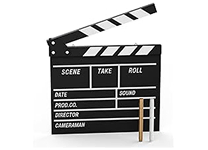
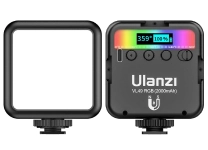
Visual production studios may use cameras, lenses, tripods, backdrops, and continuous or flash lighting to create consistent images. Select a camera around the intended work, such as interviews, product photography, streaming, or recorded lessons, and confirm that lenses and accessories fit its mount and workflow. Lighting options include LED panels, softboxes, ring lights, and light modifiers; brightness adjustment, color temperature, power source, and mounting method can guide comparisons. A tripod or stand should support the equipment securely and provide the positioning range a shoot requires. Sony is a widely recognized camera brand, while lighting kits vary in design and included components. Ubuy can help shoppers discover international products for photography and video setups. Before choosing a kit, consider available room space, the number of people or objects being filmed, and how easily the setup can be adjusted between sessions.
- Match cameras and lenses to the intended shoot
- Compare light output, color, and modifiers
- Check stands, mounts, and space requirements
Studio Accessories, Acoustics, and Equipment Care
Accessories support safe placement, clean connections, and an organized creative workspace. Common options include microphone booms, camera mounts, cable ties, USB or XLR cables, adapters, pop filters, and equipment cases. Verify connector types and cable lengths before purchase, and avoid assuming that visually similar plugs or mounts are interchangeable. Acoustic panels, bass traps, and reflection filters can help manage sound reflections, though their suitability depends on room layout and recording goals. Keep ventilation clear around powered equipment, route cables to reduce trip hazards, and use stands within their stated load limits. Dust equipment with appropriate care, inspect cables and connectors for wear, and follow manufacturer instructions for storage and cleaning. Ubuy provides a way to explore international studio accessories alongside core equipment, making it easier to compare products by function, compatibility, and intended use.
- Confirm cable, connector, and mount compatibility
- Consider room acoustics and safe equipment placement
- Inspect and care for gear regularly
Select the Right studio equipments
Choose studio equipment by mapping each purchase to a specific task: capture, monitoring, lighting, support, or editing. Make a checklist of the devices you already own, their operating connections, and the additional inputs or mounts your workflow requires. Compare specifications such as microphone pattern, interface input count, monitor connectivity, camera compatibility, light adjustment, and stand capacity rather than relying on product labels alone. For a first setup, prioritize essential components and leave room to add accessories as your projects develop. More advanced creators may value flexible routing, multiple recording channels, or adjustable lighting. Set aside space for cables and safe equipment placement, and consider how often the setup will need to move. Ubuy is a platform for discovering international studio products; review product details carefully to assess whether each item suits your intended use and existing gear.
- List your workflow and existing equipment first
- Verify specifications and system compatibility
- Prioritize essentials before adding upgrades