Essential DJ Accessories for Every Setup
DJ accessories help connect, organize, and protect the equipment used to mix and perform. A practical setup may include headphones, cables, adapters, laptop stands, controller cases, USB hubs, and replacement faders or knobs. These items support home practice, mobile gigs, studio work, and club booths, where reliable connections and accessible controls matter. Shoppers can compare compact essentials for a beginner rig with rugged accessories designed for frequent transport. Check product descriptions for connector type, cable length, mounting method, and device compatibility before choosing. Ubuy offers a way to discover international DJ accessories across different product types and configurations. The right combination depends on your gear, working space, and performance style, helping make setup more manageable and keeping equipment ready for the next session.
- Accessories for practice, studio, and live performance
- Cables, stands, cases, and replacement controls
- Match each item to your existing equipment
DJ Cables, Adapters, and Signal Connections
Cables and adapters carry audio, power, and data between decks, mixers, controllers, speakers, and computers. Common choices include RCA, XLR, quarter-inch jack, USB-A, USB-C, and MIDI cables; the correct option depends on the ports and signal path in your setup. Balanced XLR or TRS connections are often selected for compatible audio equipment, while RCA is common with consumer-level connections. Consider cable length, connector shape, shielding, flexibility, and strain relief, especially when equipment is moved or used on a busy stage. A short adapter can solve a port mismatch, but it cannot replace a required audio interface or change an incompatible signal. Labeling cables and packing spares can also make setup and troubleshooting easier during a performance.
- Check connector type at both ends
- Choose suitable length and cable construction
- Pack adapters and spares for your rig
Performance Tools for Mixing and Control
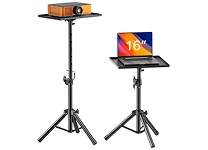
Performance accessories can make hands-on mixing more comfortable and help keep a DJ workspace organized. Depending on the setup, useful additions include replacement fader caps, knobs, jog-wheel covers, controller skins, USB hubs, and laptop stands. A stand should support the device's size and weight while allowing a stable viewing angle and enough room for cables. When adding a hub, confirm its connection standard and power requirements, and consider how many devices need to connect at once. Replacement controls should match the specific mixer or controller model, since dimensions and fitting methods vary. Brands such as Pioneer DJ, Numark, and Hercules offer different equipment ecosystems, so check the exact product and model details rather than assuming accessories are interchangeable. Small ergonomic adjustments can improve access to controls over longer sessions.
- Improve reach and workspace organization
- Verify model-specific replacement parts
- Check stand stability and hub requirements
DJ Headphones and Monitoring Accessories
Headphones let DJs cue tracks privately, preview transitions, and monitor details that may be difficult to hear through booth speakers. When comparing DJ headphones, consider closed-back construction, comfortable padding, cable length, swivel ear cups, replaceable parts, and the connector supplied. A coiled cable can offer movement near a mixer, while a detachable cable may simplify replacement or storage. Some models include a quarter-inch adapter for equipment with a larger headphone jack; confirm that the connection suits your mixer or controller. Headphone cases, spare ear pads, and cable clips can help protect frequently used gear. Ubuy provides a place to explore international DJ accessories, including monitoring-related options, but product specifications should guide your selection. Fit and listening comfort are personal, so consider your working environment and how long you typically wear headphones.
- Compare fit, padding, and cable design
- Check the supplied plug and adapter
- Consider cases and replacement ear pads
DJ Stands, Cases, and Equipment Care
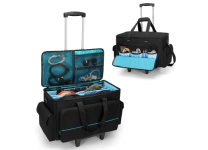
Stands, bags, and protective accessories help create a usable workspace and make equipment easier to transport. Look for controller bags or hard cases sized for the exact device, with compartments for cables, power supplies, and small tools. Padding, closures, handles, and reinforced corners are useful details to compare, while a flight case may suit heavier transport needs. Laptop and tablet stands should have a secure base, adjustable positioning, and adequate ventilation for the device. For care, use a clean, dry microfiber cloth on suitable surfaces and follow the equipment maker's cleaning guidance; avoid applying liquids directly to electronics. Keep cables loosely coiled and store accessories away from pressure that could bend connectors. Good storage habits help reduce clutter and support a smoother setup at home, in a studio, or at an event.
- Match case dimensions to the equipment
- Compare padding, compartments, and handles
- Store and clean gear with care
Select the Right dj accessories
Start by listing the equipment in your setup and identifying the accessory that solves a specific need, such as a missing connection, better monitoring, easier transport, or a more comfortable control position. Compare compatibility details, including model numbers, connector standards, dimensions, and power requirements. Then weigh practical features such as durability, portability, adjustability, replaceable parts, and storage space against how often and where you perform. For a compact home rig, prioritize essentials that fit your available desk space; for mobile work, consider protective cases and spare cables. Avoid buying based on appearance alone, since similar accessories may use different fittings or standards. Ubuy can help shoppers discover international DJ accessories, while careful review of product specifications remains important. A focused shortlist makes it easier to choose useful add-ons and build a dependable setup over time.
- Identify a real setup need first
- Confirm fit, connections, and requirements
- Balance portability with durability