Build a Computer Recording Setup
Computer recording equipment brings sound into a desktop or laptop for music production, podcasting, voice-over, streaming, and other creative work. A typical setup combines a microphone or instrument, an audio interface, recording software, headphones, and the necessary cables. Some creators use a USB microphone that connects directly to a computer, while others choose separate components for more control over inputs and sound. The right configuration depends on what you record, how many people or instruments need to connect, and where you work. Check available USB, USB-C, or Thunderbolt ports, operating-system support, and the included drivers or software before purchasing. Ubuy helps shoppers discover computer recording equipment from international product ranges, making it easier to explore different recording approaches and component types in one place.
- For music, podcasts, voice-over, and streaming
- Choose USB microphones or separate components
- Check computer ports and software compatibility
Microphones for Voice and Instruments
Microphone choice affects how a recording captures tone, detail, and surrounding sound. Condenser microphones are commonly used for vocals, spoken-word recording, and acoustic instruments in controlled spaces; dynamic microphones are often selected for loud sources, live-style podcasting, or rooms where background noise is a concern. USB models include a built-in digital connection, while XLR microphones generally connect through an audio interface or mixer. Polar patterns such as cardioid help determine which directions a microphone picks up most strongly. Compare frequency response, sensitivity, self-noise, and maximum sound pressure level against your intended use. A pop filter can reduce plosive sounds, and a shock mount may limit handling and desk vibrations. Brands such as Shure, Audio-Technica, and RØDE offer familiar options across several microphone styles.
- Compare condenser, dynamic, USB, and XLR models
- Match polar pattern to room and recording style
- Consider a pop filter, stand, and shock mount
Audio Interfaces, Mixers, and Connections
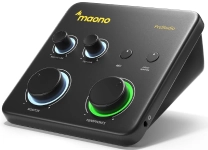
An audio interface converts microphone and instrument signals into digital audio that recording software can process, then sends computer audio to headphones or speakers. Consider how many inputs you need at once, whether you require microphone preamps with phantom power for compatible condenser microphones, and whether instrument-level inputs suit a guitar or bass. Sample rate and bit depth describe recording formats, but input count, dependable controls, and monitoring features may matter more in everyday use. A mixer can provide hands-on level adjustment and multiple channels, while some interfaces also include loopback for capturing computer audio during streaming. Verify connector types and computer compatibility, including whether the unit is bus-powered or needs a separate supply. Focusrite, PreSonus, and Universal Audio are established names in this equipment category.
- Match input count to simultaneous sources
- Check preamps, phantom power, and instrument inputs
- Confirm connectors, power, and computer support
Headphones, Speakers, and Recording Accessories
Monitoring equipment helps you hear recordings clearly while capturing and editing audio. Closed-back headphones reduce sound leaking into a nearby microphone, which is useful for vocal tracking and remote conversations. Open-back headphones can offer a spacious listening presentation but generally allow more sound to escape. Studio monitors provide speakers designed for near-field listening; room placement and acoustics influence what you hear, so headphones may be useful for checking a mix in another way. Useful accessories include XLR and instrument cables, microphone stands, desktop arms, pop filters, shock mounts, and acoustic treatment. Match cable connectors and lengths to your layout, and avoid buying accessories based on appearance alone. Ubuy can be a place to explore microphones, monitoring gear, and supporting accessories together while comparing the needs of a complete recording desk.
- Use closed-back headphones for tracking
- Consider monitors, placement, and room acoustics
- Check accessory connectors and setup requirements
Recording Software, Compatibility, and Care
Digital audio workstations (DAWs) let you record, edit, arrange, and mix audio, while plugins add effects and virtual instruments. Common workflows include recording separate tracks, editing spoken-word pauses, applying equalization or compression, and exporting a finished file in a suitable format. Before choosing a hardware bundle, check whether its software works with your operating system and preferred DAW, and confirm support for the connection standard and driver type. Keep firmware and drivers current when recommended by the manufacturer, and follow its instructions for installation and troubleshooting. Protect microphones from moisture and dust, store cables without tight kinks, and use suitable cases when equipment is moved. For a quieter setup, manage cable routing and computer fan noise, and monitor recording levels to avoid digital clipping.
- Check DAW, plugin, driver, and OS support
- Keep recording levels clear of digital clipping
- Store microphones and cables with care
Select the Right computer recording equipment
Start by defining the main task: a solo podcast, a vocal-and-guitar performance, a multi-person discussion, or a home music studio may call for different equipment. Count the microphones and instruments you will record simultaneously, then choose an interface or mixer with suitable inputs and monitoring. Decide whether a simple USB microphone or a modular XLR setup better fits your experience, room, and plans to expand. Check desk space, connection types, headphone outputs, power needs, and software compatibility as a complete system rather than as isolated specifications. Set a practical budget across the microphone, interface, headphones, stands, and cables so essential accessories are not overlooked. Ubuy offers a way to discover international computer recording equipment options; compare product details and compatibility information carefully before choosing a setup for your workflow.
- Begin with your recording use case
- Plan inputs, connections, and room setup
- Compare full-system compatibility before buying